NCBI Blast - Online
Introduction
NCBI offers a public service, QBlast, that searches molecular sequence databases with the Blast algorithm. Its main advantages are its versatility and that no database maintenance is required. Performance depends on the availability of the NCBI servers.
NCBI Blast - Online is one of the ways to run a Blast search in OmicsBox. See Blast Search for the overall Blast workflow and where to launch it.
Run
Select NCBI Blast on the first page of the Blast wizard. The Blast Configuration page provides the following parameters:
- Email. An e-mail address to associate to the analysis. Required by the NCBI Blast web service.
-
Blast Program. The Blast algorithm, chosen according to the type of the query sequences and of the database. The main programs are:
blastp: protein query against a protein database.blastx: nucleotide query, translated in all six reading frames, against a protein database. Used to find the potential protein products of an unknown nucleotide sequence.blastn: nucleotide query against a nucleotide database.tblastn: protein query against a nucleotide database translated in all six reading frames.tblastx: nucleotide query, translated in all six frames, against a nucleotide database also translated in all six frames.
Several programs also offer variants:
-fast(for exampleblastx-fast,blastp-fast,tblastn-fast): a faster preset that uses a larger word size, best suited to finding closely related sequences at the cost of sensitivity for distant matches.-short(for exampleblastp-short,blastn-short): tuned for short query sequences, using a smaller word size and adjusted scoring.megablast(ablastnmode): the fastest nucleotide search, for highly similar sequences such as those within a species.dc-megablast(discontiguous megablast, ablastnmode): for more divergent nucleotide sequences, such as cross-species comparisons.
Only searches against a protein database (
blastp,blastx) produce hits usable for GO mapping and annotation, since Gene Ontology terms are linked to proteins. Default:blastx-fast. * Blast DB. The database to search in. The field is an editable list pre-populated with common NCBI databases (for examplenr,swissprot,refseq_protein,pdb, andnt); any other valid NCBI database name can also be entered. Default:nr. For the full list of protein databases available at NCBI, see this reference. * Taxonomy Filter. Search for Blast results only in the selected taxonomy. * Blast Expectation Value (e-Value). The statistical significance threshold for reporting matches. Matches whose statistical significance is greater than the threshold are not reported. Lower thresholds are more stringent. * Number of Blast Hits. The number of alignments to report (minimum 1). * Blast Description Annotator. The BDA finds the best possible description for a new sequence based on a given Blast result.
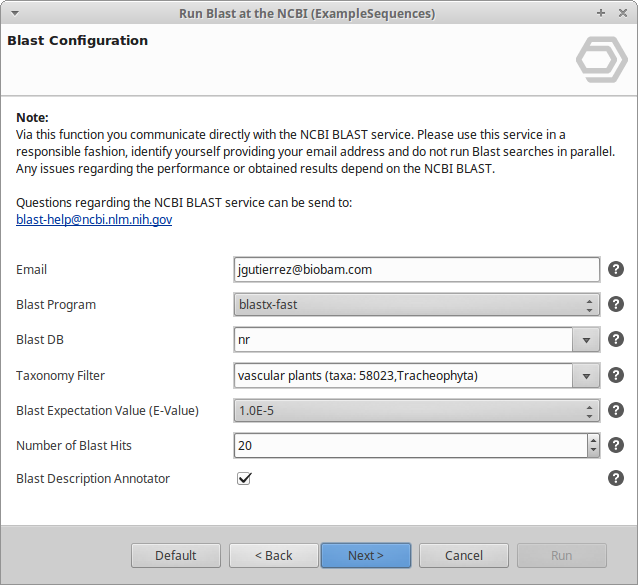
Figure 1. NCBI Blast Configuration page.
The Advanced page provides additional parameters:
- Word Size. The length of the initial word of the local alignment. Smaller values increase sensitivity; larger values increase speed. Default: 6 (for
blastx-fast). - Low Complexity Filter. Applies SEG filtering of low-complexity protein regions before the search.
- HSP Length Cutoff. The minimum alignment length of an HSP, used to exclude hits with only short local alignments. HSPs shorter than this value are discarded, and a hit is excluded when none of its HSPs reaches it. The length is the number of aligned positions, gaps included: amino acids for protein and translated searches, nucleotides for
blastn. Hits whose database sequence is shorter than this value are also excluded. A value of 0 disables both checks. Default: 33. - HSP-Hit Coverage. The minimum percentage of the hit sequence that one of its HSPs must cover, measured over the region of the hit that the HSP aligns to (0-100). Only HSPs that pass the HSP Length Cutoff count. For example, 80 keeps a hit only if at least one of its HSPs spans 80% or more of the hit length. Low values are recommended: most low-coverage hits come from short or partial query sequences matched against longer database sequences. Hits without subject coordinates are not removed by this filter. Default: 0 (no filter).
- Filter by Description. Removes hits whose description contains the given text. Separate several terms with semicolons. Terms are case-sensitive, and a single term is also matched against the hit ID.
On the Save Results page, the results can be saved in four formats, each to its own output folder: XML2 (enabled by default), XML, TXT, and HTML.
Results
Sequences with hits turn orange and sequences without hits turn dark red in the functional annotation project. The Blast statistics charts, Blast side-panel actions, and the individual Blast result view are described in the Blast Search Results section.
OmicsBox Engine
This tool can be run from the command line via the OmicsBox Engine.
Command: omicsbox ncbi-blast [options]
Inputs
| Flag | Type | Required | Description |
|---|---|---|---|
--i-input-fasta |
file | Yes | Query Input |
--i-project |
file | Yes | Sequence Project |
Parameters
| Flag | Type | Default | Range / Candidates | Required | Description |
|---|---|---|---|---|---|
--email |
string | No | |||
--number-of-hits |
integer | 20 | ≥ 1 | No | Number of Blast Hits |
--desc-annotator |
boolean | true | No | Blast Description Annotator | |
--blast-program |
enum | blastx-fast | blastxblastx-fastblastp |
No | Blast Program |
--blast-expect-value |
enum | 1.0E-3 | 1000105 |
No | Blast Expectation Value (E-Value) |
--blast-db |
enum | nr | nrswissprotrefseq_protein |
No | Blast XDb |
--max-sequence-length |
integer | 8000 | ≥ 0 | No | |
--blast-low-complexity-filter |
boolean | true | No | Low Complexity Filter | |
--blast-word-size |
integer | 6 | ≥ 0 | No | Word Size |
--blast-hit-desc-filter |
string | No | Filter by Description | ||
--blast-min-hsplength |
integer | 33 | ≥ 0 | No | HSP Length Cutoff |
--species |
string | No | Taxonomy Filter | ||
--hsp-hit-coverage-cutoff |
integer | 0 | 0 – 100 | No | HSP-Hit Coverage |
--blast-xml2-result-enabled |
boolean | true | No | Xml2 Blast Result Download | |
--blast-xmlresult-enabled |
boolean | false | No | Xml Blast Result Download | |
--blast-txtresult-enabled |
boolean | false | No | Txt Blast Result Download | |
--blast-htmlresult-enabled |
boolean | false | No | Html Blast Result Download |
Global options (
--local-folder,--cloud-folder,--output-format,--config,--detach,--verbose, …) are shared by every Engine tool and are not repeated here — see the OmicsBox Engine reference.