Rfam RNA Family Search
Introduction
The Rfam database is a collection of RNA families, each represented by multiple sequence alignments, consensus secondary structures and covariance models (CMs). The families in Rfam break down into three broad functional classes: non-coding RNA genes, structured cis-regulatory elements and self-splicing RNAs. Typically these functional RNAs often have a conserved secondary structure which may be better preserved than the RNA sequence. The CMs used to describe each family are a slightly more complicated relative of the profile hidden Markov models (HMMs) used by Pfam. CMs can simultaneously model RNA sequence and the structure in an elegant and accurate fashion (Rfam description from: http://rfam.xfam.org/ ).
Run
This functionality can be found under Functional Analysis → Rfam RNA Family Search. A dialog screen appears (Figure 1). Besides the input file containing sequences, tt requires single parameter, the Sequence Length Filter, which skips sequences longer than the given length in bases (default: 2000; range: 1-10000).
Click on the Run button to start the analysis. It may take a while depending on the number of sequences and the EMBL-EBI servers.
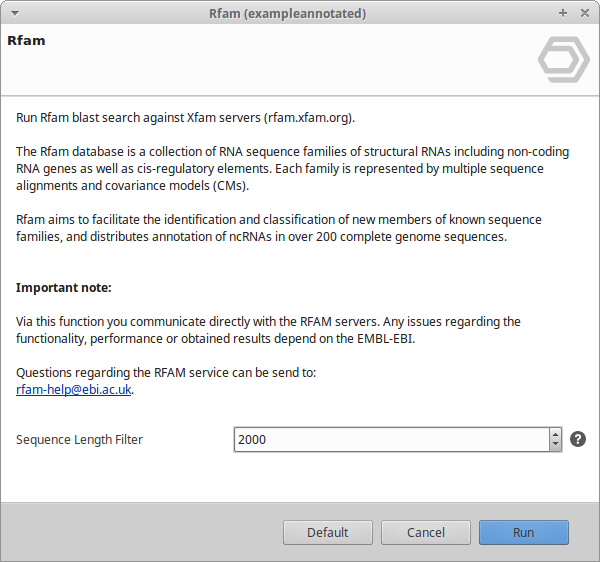
Figure 1: Rfam Dialog
Results
Once Rfam analysis has begun, a table with the corresponding results is displayed in a new tab (Figure 2). Rows are coloured by result: orange when Rfam found hits (RFAM tag) and red when no hits were found (NO-RFAM tag). White rows are sequences that have not been analysed yet.
Each row is a query sequence. When a sequence has more than one hit, the hit-related columns show the values of its best hit; the full list of hits is available from the context menu. The columns are:
- Nr. A consecutive number for each row.
- Tags. The result status: RFAM if at least one hit was found, or NO-RFAM otherwise.
- Sequence. The query sequence name.
- #Hits. The number of Rfam hits found for the sequence.
- Start and End. The start and end coordinates of the best hit on the query sequence.
- Score. The bit-score of the best hit against the Rfam covariance model.
- Strand. The strand of the best hit (+ or -).
- e-Value. The e-value of the best hit.
- GC. The GC content of the best hit.
- Family ACC. The accession of the matched Rfam family (for example RF00001).
- Family ID. The name of the matched Rfam family.
- Biotype. The functional class (biotype) of the matched Rfam family.
- GOs. The Gene Ontology terms associated with the matched Rfam family.
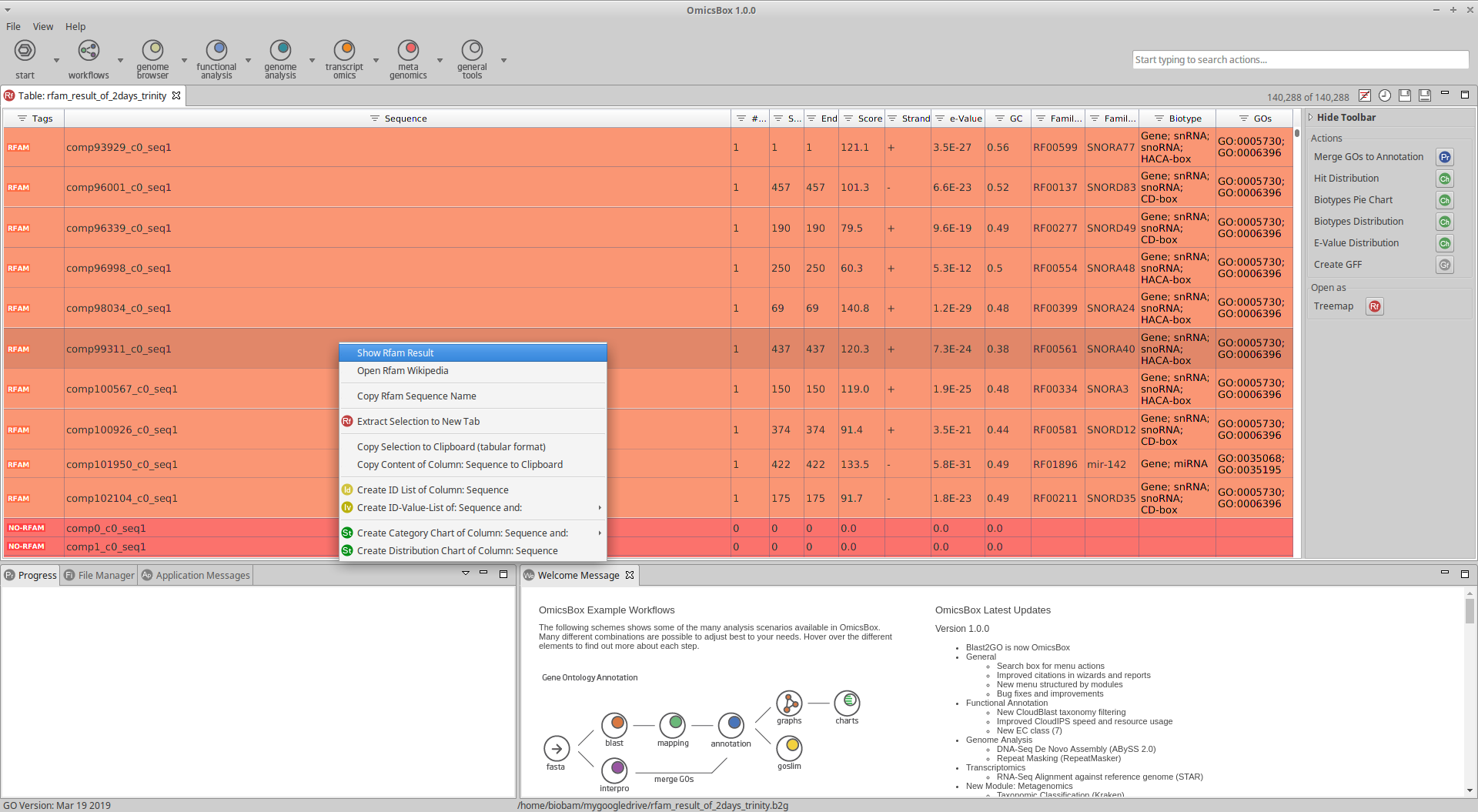
Figure 2: Rfam Table Results
Side Panel
Actions
- Create GFF. Open the Rfam results as a GFF file in a new tab.
- Merge GOs to Annotation. Merge the GO terms of the matched RNA families into a functional annotation project, adding them to the sequence annotations.
Charts
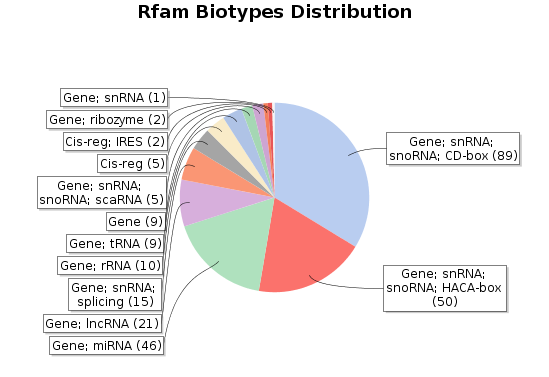
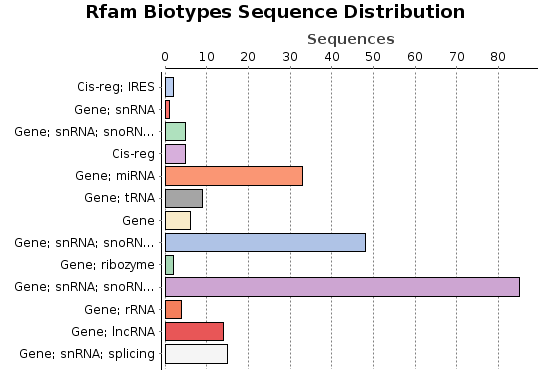
- Biotypes Distribution. The same distribution as the pie chart, shown as a bar chart.
- Biotypes Pie Chart. A pie chart with the distribution of the Rfam families of the sequences.
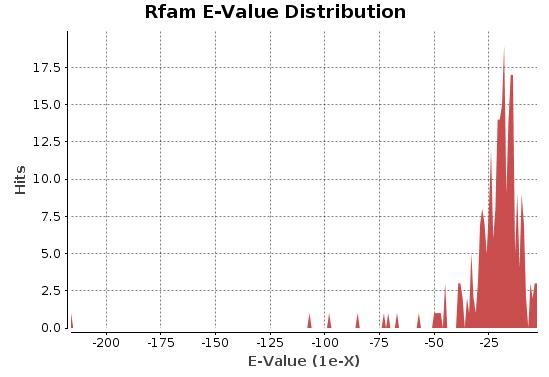
- E-Value Distribution. A distribution of the e-values of the Rfam hits.
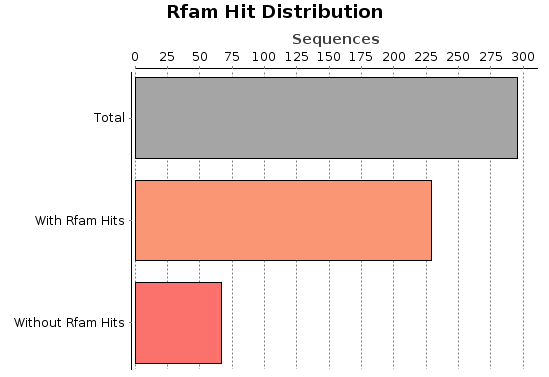
- Hit Distribution. A distribution chart of the number of sequences with hits in the Rfam analysis.
Export
- Export Table. Export the results shown in the Main Viewer to a text file with columns separated by tab.
Context Menu
Right-click a sequence to open its context menu. Apart from the generic Context Menu options, the Rfam results include:
- Show Rfam Result. Show the detailed Rfam hits found for the selected sequence.
- Open Rfam Wikipedia. Open the Wikipedia page of the matched Rfam family.
- Copy Rfam Sequence Name. Copy the name of the selected sequence(s) to the clipboard.
OmicsBox Engine
This tool can be run from the command line via the OmicsBox Engine.
Command: omicsbox rfam [options]
Inputs
| Flag | Type | Required | Description |
|---|---|---|---|
--i-fasta |
file | Yes | Query Sequences |
Parameters
| Flag | Type | Default | Range / Candidates | Required | Description |
|---|---|---|---|---|---|
--seq-length |
integer | 2000 | 1 – 10000 | No | Sequence Length Filter |
Global options (
--local-folder,--cloud-folder,--output-format,--config,--detach,--verbose, …) are shared by every Engine tool and are not repeated here — see the OmicsBox Engine reference.