Blast Search
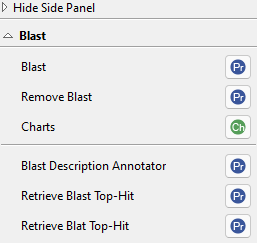
Figure 1. Blast side panel section.
Introduction
OmicsBox uses the Basic Local Alignment Search Tool (Blast) to find sequences similar to the query set. For details on the Blast algorithm, see http://www.ncbi.nlm.nih.gov/BLAST. Blast is also the first step of the Blast2GO functional annotation methodology.
Blast can be run in five different ways in OmicsBox, each described on its own page:
- Diamond Blast. A fast aligner on the OmicsBox cloud, designed for larger datasets (5000+ sequences).
- CloudBlast. Standard NCBI Blast+ searches on a dedicated OmicsBox cloud cluster, independent of the NCBI servers.
- CloudBlast Against Custom Database. Blast against a custom protein FASTA database built on the OmicsBox cloud.
- NCBI Blast - Online. The public NCBI Blast web service. Note: Performance and results depend on the NCBI Blast Web Service.
- NCBI Blast - Local. Blast against a local database using the local resources.
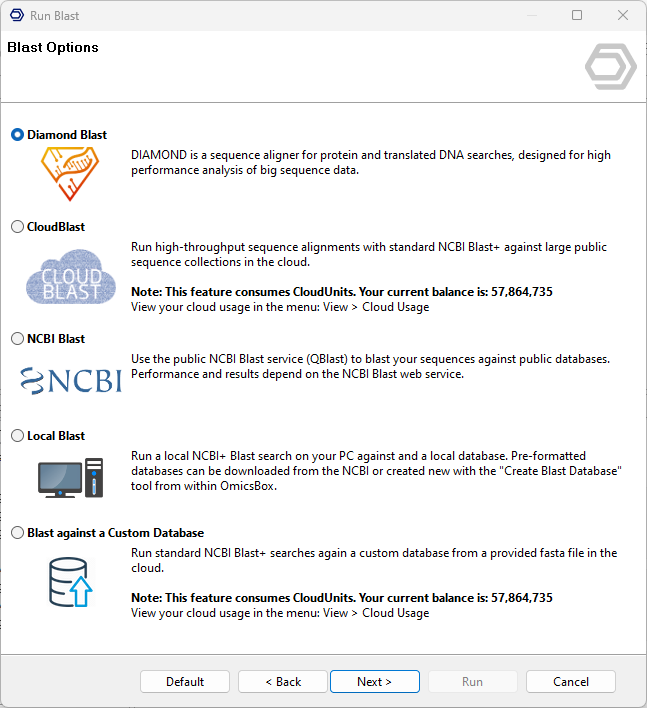
Figure 2. Choose between Diamond, CloudBlast, NCBI, Local, or Custom Database.
Run
The Blast functionalities are available under Functional Analysis → Blast Search → Blast, or from the Side Panel once a sequence project has been loaded (functional analysis > Load > Load Fasta File).
The Blast Configuration page depends on the selected Blast type. Its parameters are described on each mode page (see the Introduction links above). The Advanced and Save Results pages below are shared by the CloudBlast, NCBI, Local, and Custom Database modes.
Results
As the Blast search progresses, sequences with successful Blast results change colour in the functional annotation project from white to orange, and the Blast result columns are filled. Sequences for which no result could be retrieved turn dark red.
The shared results table, its columns, and the common Side Panel and context menu options are described on the Functional Annotation Project page. This section covers only the Blast-specific results.
Blast fills the following columns in the Main Sequence Table:
- #Hits. The number of Blast hits found for the sequence.
- e-Value. The lowest (most significant) e-value among the sequence's hits. It represents the number of hits you can expect to see by chance when searching a sequence database of a particular size. It measures the statistical significance of a sequence alignment; the lower the e-Value, the more significant the match
- sim mean. The mean similarity of the sequence's hits, shown as a percentage.
Side Panel - Blast
The Blast group of the Side Panel provides the actions specific to Blast results. The rest of the groups are explained on their corresponding manual sections and in the main Functional Annotation project manual.
Remove Blast
Removes the Blast results from the selected sequences. The sequence description can also be removed or kept.
Charts
Several Blast statistics charts can be generated for a global view of the results. They help choose cut-off levels for the e-value, similarity, and annotation thresholds at the annotation step.
- E-Value Distribution. The distribution of e-values for all selected Blast hits. Useful to evaluate the alignment success for a given database and to adjust the e-value cutoff in the annotation step.
- Similarity Distribution. The distribution of all calculated sequence similarities (percentages). Helps decide how restrictive the annotation cutoff should be: the smaller the similarity, the smaller the cutoff should be.
- Species Distribution. The species to which most sequences were aligned during the Blast step.
- Top-Hit Species Distribution. The species distribution of all top Blast hits.
- Hit Distribution. The distribution of the number of hits for the blasted sequences.
- Hsp Distribution. The distribution of HSPs per hit.
- Hsp/Seq Distribution. The coverage percentage between the HSPs and their corresponding sequences.
- Hsp/Hit Distribution. The same as above but for hits instead of sequences.
HSPs
The High-scoring Segment Pairs (HSPs) is a local high-similarity alignment between a query sequence and a hit, the region that Blast actually aligns. It is the foundational unit of a BLAST alignment, representing the contiguous matching region between the query sequence and a database sequence (the hit) that achieves the highest alignment score without introducing any gaps. A single hit can contain more than one HSP when the query and the hit are similar over several separate regions.
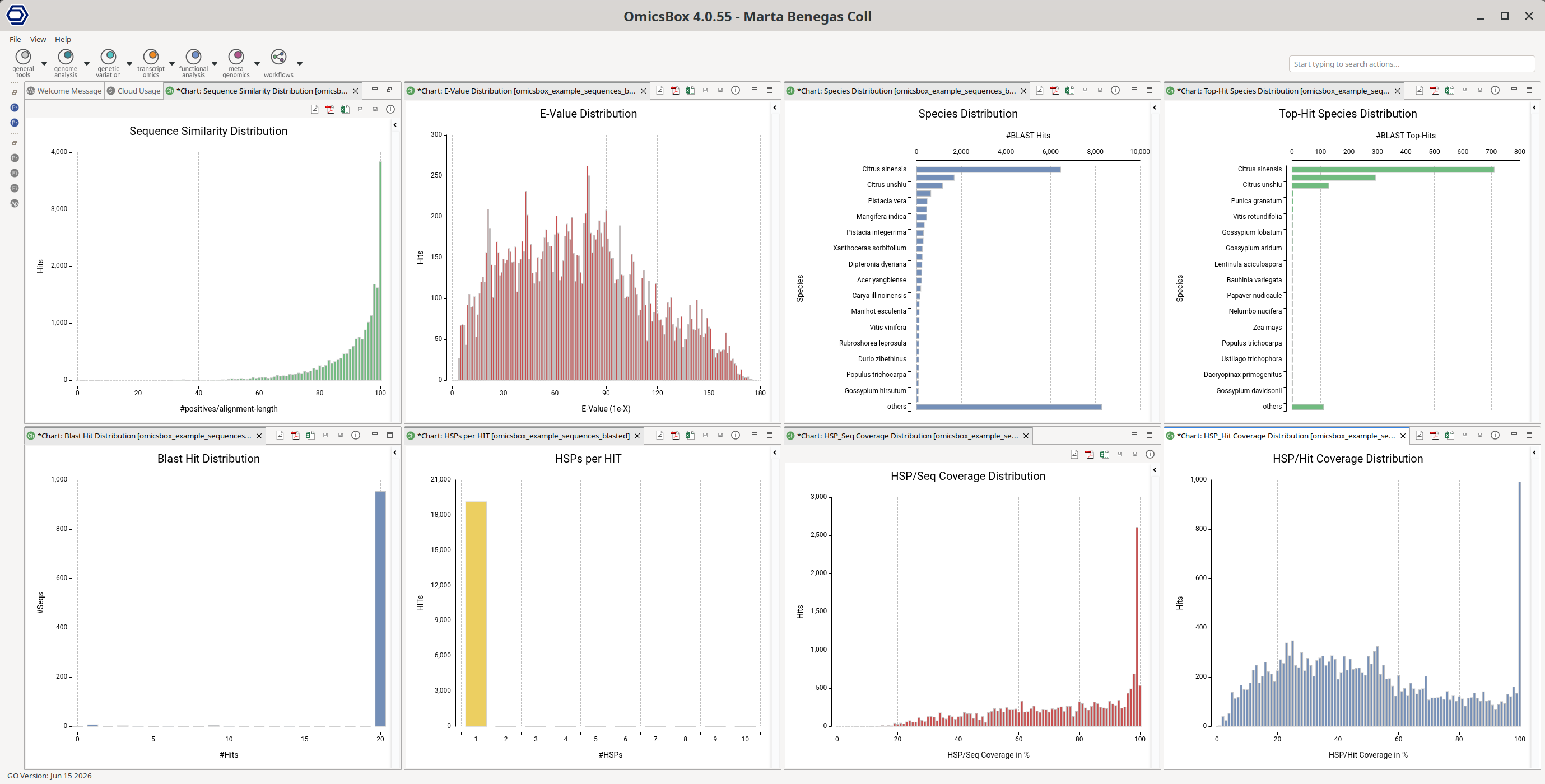
Figure 4. Blast Charts.
Blast Description Annotator
Runs the Blast Description Annotator (BDA) algorithm, which finds the best possible description for a new sequence based on its Blast result. It also allows recovering the original description: when this option is marked, the description column shows the top Blast hit description instead of the BDA one.
Retrieve Blast Top-Hit
Retrieves the sequence information of top Blast hits from an OmicsBox project to improve the annotation of a dataset. Data is obtained from NCBI, Ensembl, or UniProt web services and stored in a new project or used to replace the existing IDs and sequences.
- Action. Replace the sequences in the dataset, or extract them into a new dataset.
- Sequence Name. Keep the original sequence names or rename them with the names of the Top-Hits.
- Replace Query With Top-Hit. If checked, the original sequence is replaced by the similar sequence found. Enabled by default.
- Filters Applied to Top-Hit. The Top-Hit is only retrieved if it passes the specified filters. See above for more details into e-Value, similarity, Hsp/Hit Coverage, and and Hsp/Query Coverage.
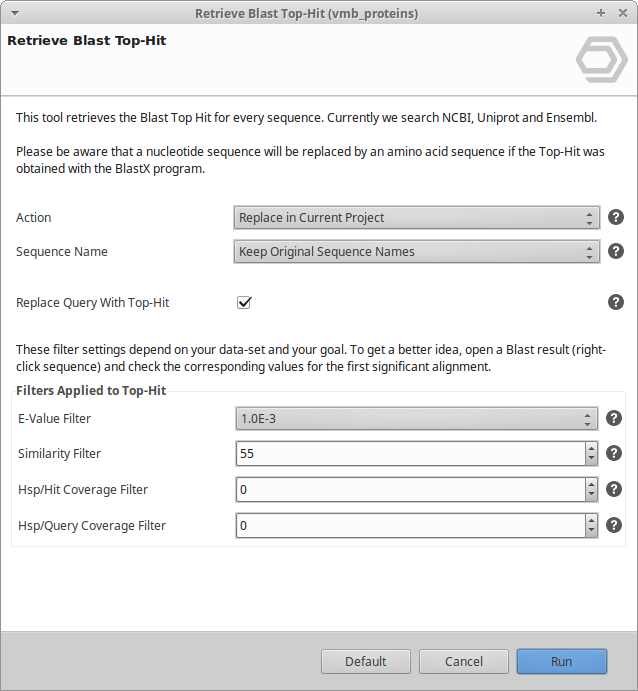
Figure 5. Retrieve Blast Top-Hit dialog.
Retrieve Blat Top-Hit
BLAT (Blast-like alignment tool) rapidly scans for short matches and extends them into high-scoring pairs, with special handling of introns in RNA/DNA alignments.
- Action. Replace the sequences in the dataset, or extract them into a new dataset.
- Sequence Name. Keep the original names or rename them to the Blat Top-Hit sequence names.
- Replace Query With Top-Hit. If checked, the original sequence is replaced. Enabled by default.
- Reference Fasta. The FASTA file used to search for similar sequences.
- Similarity. Filter by similarity.
- Check for Reverse Strand. If checked, BLAT also considers the reverse strand.
This tool is useful after Gene Finding, to replace the sequence IDs retrieved from the algorithm with the top hit from a reference FASTA. See the online tutorial.
Please cite BLAT: Kent WJ. BLAT — the Blast-like alignment tool. Genome Res. 2002;12(4):656-664. doi:10.1101/gr.229202.
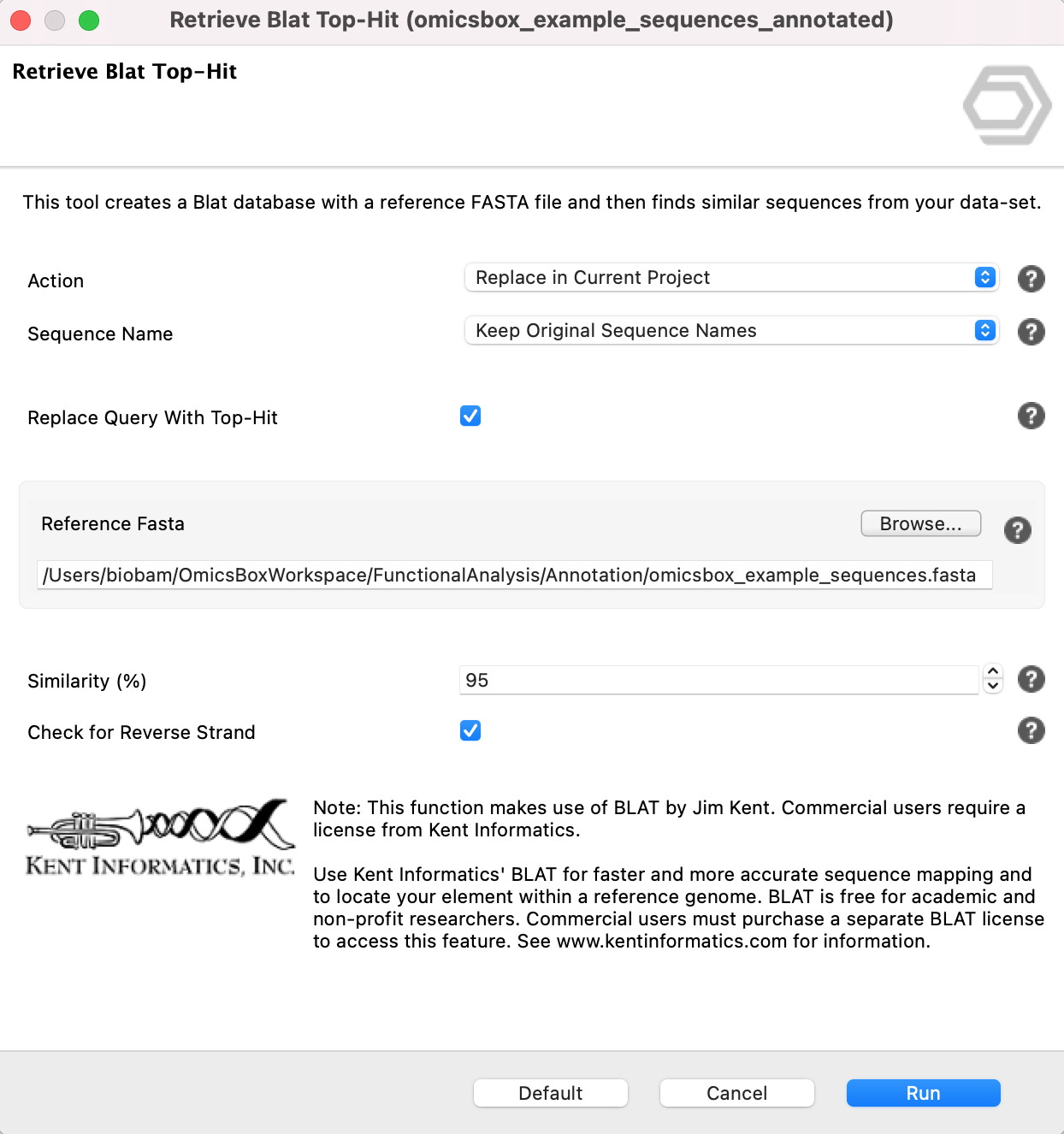
Figure 6. Retrieve Blat Top-Hit wizard.
Export
Export Blast Top-Hits. Export a tab-separated text file with the Blast results for the Top-Hit of each sequence, from Side Panel → Export → Export Blast Top-Hits.
Context Menu
Right-click a sequence in the Main Sequence Table to open the Context Menu (see Functional Annotation Project for the shared options). The Blast-specific option is:
- Show Blast Result. Opens a tab with the similarity search results of the selected sequence. For each hit it lists the blast statistics. The results can also be viewed in an alignment view.
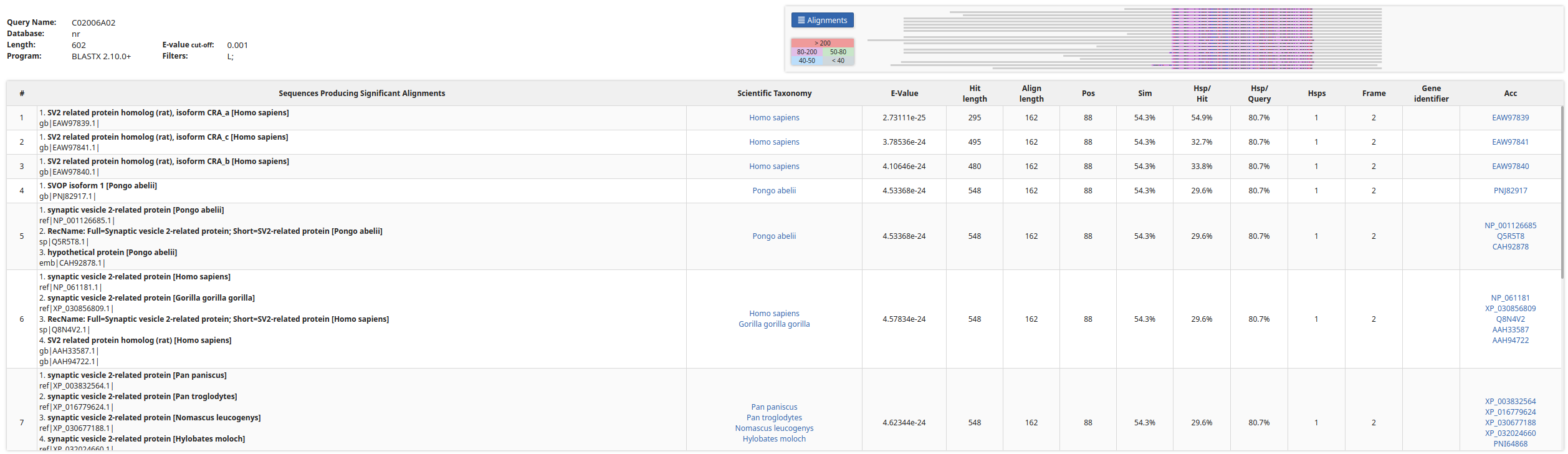
Figure 7. Individual Blast result, table view.
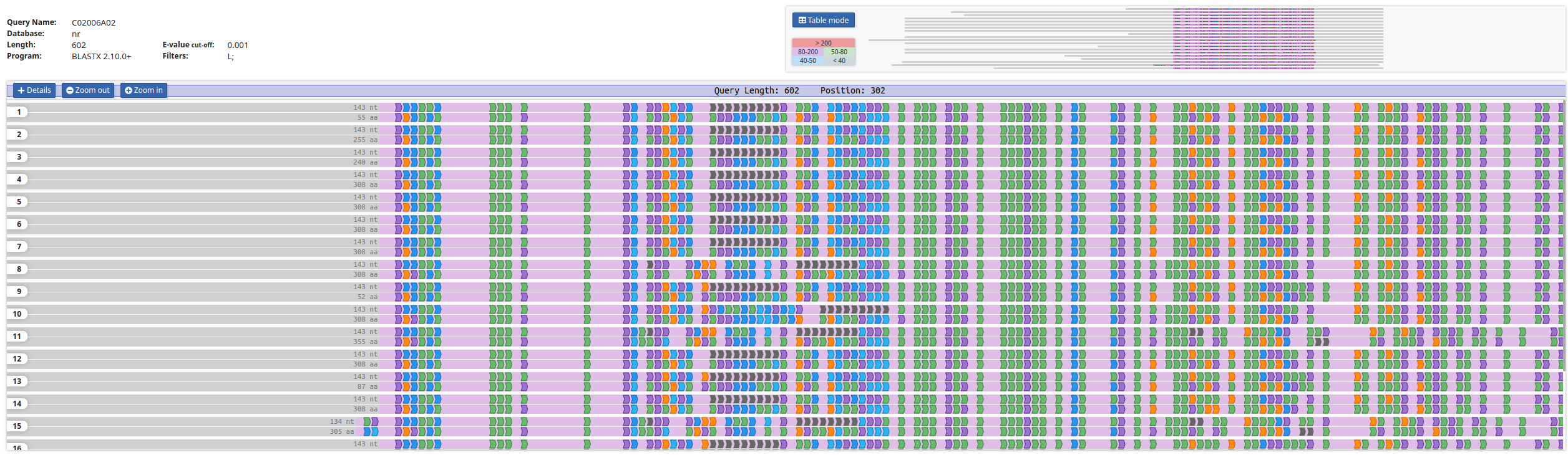
Figure 8. Individual Blast result, alignment view.