OmicsBox for AI Agents
Introduction
OmicsBox for AI Agents gives AI agents access to the bioinformatics tools and analyses of OmicsBox. It works with the AI assistants you may already use, such as Claude and ChatGPT. Once connected, you can ask the assistant in everyday language to find the right OmicsBox tool, run it on your data in OmicsCloud, check how the job is going, and open the results. You do not need to write code, learn command-line options, or install anything on your computer.
The connection is designed to complement the desktop application and OmicsBox Web rather than replace them. The assistant runs the same tools on the same cloud infrastructure, and its results are saved to your cloud storage, where you can open them in OmicsBox Web or in the desktop application. All of them share the same OmicsBox account, subscription, and cloud storage.
What you can do
Some examples of what you can ask:
- "Which OmicsBox tools can I use to annotate a set of protein sequences?"
- "Run InterProScan on proteins.fasta in my Uploads folder."
- "Split my assembly into 4 FASTA files of similar size."
- "Run a differential expression analysis with DESeq2 on counts.txt, comparing treated and control samples."
- "How is my job going?" or "Show me the results of my last run."
The assistant chooses the tool, reads its parameters, asks you about anything that is unclear, and submits the job. When the job is complete, it gives you a link that opens the result directly in OmicsBox Web.
How it works
The assistant does not run the analyses itself. It acts on your behalf through a secure connection to OmicsBox:
- You ask the assistant for an analysis in your own words.
- The assistant looks up the matching OmicsBox tool and its parameters, and submits the job to OmicsCloud using your account.
- OmicsCloud runs the analysis, exactly as it does when you launch a cloud tool from the desktop application.
- The results are saved to your cloud storage. The assistant gives you a link to open them in OmicsBox Web.
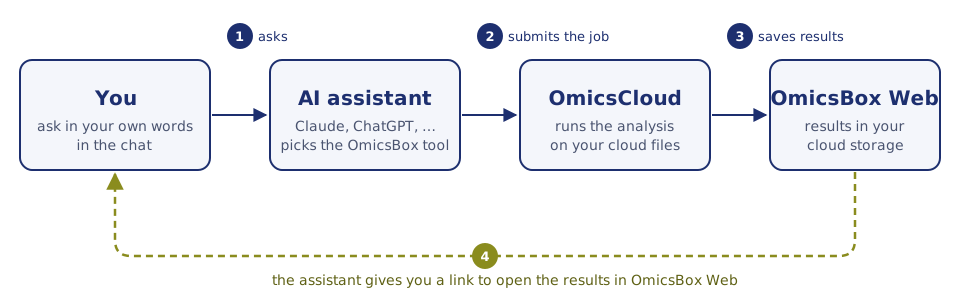
Figure 1. You ask the AI assistant, the assistant submits the job to OmicsCloud, the results are saved to your cloud storage, and the assistant gives you a link to open them in OmicsBox Web.
Cloud jobs run in the background. You can continue the conversation, close it, or come back later and ask the assistant for the status of the job.
What you need
- An OmicsBox account that has signed in to OmicsBox Web or to the desktop application at least once.
- An active OmicsBox subscription to run analyses. You can connect an assistant without one, but it cannot start jobs until a subscription is available.
- An AI assistant that supports custom connectors, such as Claude, ChatGPT, Claude Code, Codex, Cursor, or VS Code. Some assistants offer custom connectors only on certain plans, or only after an administrator enables them.
The steps for each assistant are described in Connect Your AI Assistant.
Costs
There is no separate charge for connecting an assistant. The analyses it starts use Cloud Units from the subscription you choose when you connect, in the same way as analyses launched from the desktop application. Most tools are included in the subscription at no extra cost. For details, see Cloud Units.
Any charges for the AI assistant itself depend on your plan with the assistant provider.
Your data and privacy
- Your files stay in OmicsBox. Input files and results are stored in your OmicsBox cloud storage. The assistant works with file names and cloud paths, not with copies of your data.
- The assistant sees what it needs to run a tool. This includes tool names, parameter values, file names, job status, and log messages. When you ask it to summarize a result, it also reads the content of the result files it uses for that summary.
- Access is personal and can be revoked. Each person connects with their own OmicsBox account. You can disconnect an assistant at any time from Settings > Connected apps in OmicsBox Web.
- Your conversation is governed by your assistant provider. How the provider stores and uses your conversations depends on its own privacy policy and on your plan settings.
Sensitive data
Before you work with patient data or other regulated information, check that your use of both OmicsBox and your AI assistant complies with the policies of your organization.
For developers: technical details
The connection uses the open Model Context Protocol (MCP), a standard that lets AI assistants use external tools. OmicsBox provides a remote MCP server at https://mcp.biobam.com/engine using the Streamable HTTP transport. Sign-in uses OAuth 2.1 with dynamic client registration, so compatible clients connect with the URL alone. As an alternative, a personal Engine API key can be sent as a bearer token. The server exposes the tools of the OmicsBox Engine, so the set of tools and their parameters match the Engine.
Where to go next
- Connect Your AI Assistant: add OmicsBox to Claude, ChatGPT, Claude Code, and other assistants.
- Working with Your Assistant: upload files, run analyses, and open the results.
- Tips, Troubleshooting & FAQ: get better answers and solve common problems.