MEGAHIT
Introduction
MEGAHIT is an NGS de novo assembler for assembling large and complex metagenomics data in a time- and cost-efficient manner. MEGAHIT assembles the data as a whole, i.e. no pre-processing like partitioning and normalization is needed (Figure 1, Figure 2, and Figure 3).
MEGAHIT was created by the same research group that developed SOAPdenovo and SOAPdenovo2, and may be seen as the successor of these tools. It uses a range of k-mer values for iteratively improving assemblies, in a strategy adopted from the IDBA assemblers. It employs a new data structure, the succinct de Bruijn graph, designed to significantly reduce memory requirements. As an additional step to further reduce memory consumption, only k-mers occurring at a frequency above a specified cutoff are retained as solid k-mers, while the rest is removed as potential sequencing errors. By default, the cutoff value is 2, so k-mers occurring at least twice are kept while singleton k-mers are discarded. Because this eliminates not only sequencing errors, but also removes information from genuinely low abundant genome fragments, a mercy k-mer strategy was introduced. It recovers discarded k-mers if they provide new and useful information within a trustworthy context: discarded singleton k-mers that occur on the same read as solid k-mers, and are needed to connect these solid k-mers within the de Bruijn graph, are recovered and added to the graph. This minimizes the loss of sequencing information while still keeping the influence of sequencing errors low.
In comparison to metaSPAdes, MEGAHIT needs fewer resources and less time, but metaSPAdes creates better results, i.e. higher Nx values.
Input
- Sequencing Data: Choose the type of input data: single-end, paired-end or interleaved paired-end reads. If paired-end is selected, two files per sample are required and the file pattern has to be provided.
- Input Reads: Provide the files containing sequencing reads. These files are assumed to be in FASTQ or GZ format.
-
Paired-end configuration: When working with paired-end libraries, a pattern has to be established to help the software distinguish between upstream and downstream read files. Per default, we assume the following pattern:
- upstream: SampleA_1.fastq
- downstream: SampleA_2.fastq
Note
For example, if the upstream file is named SRR037717_1.fastq and the downstream one SRR037717_2.fastq, you should establish "_1" as the upstream pattern and "_2" as the downstream pattern.
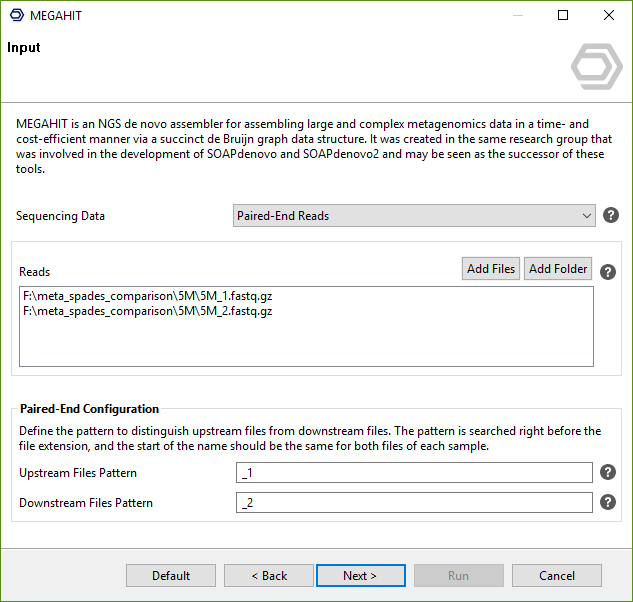
Figure 1. MEGAHIT assembly wizard: input page.
Configuration
- Minimum Multiplicity: K-mers that appear fewer times are filtered out. A (kmin+1)-mer with multiplicity lower than d will be discarded. Be cautious about setting d lower than 2, which leads to a much larger and noisy graph. We recommend using the default value 2 for metagenomics assembly.
-
K-mer Sizes: Provide a list of k-mer sizes for iterative graph creation. Values have to be odd and in the range 15-255.
- For ultra-complex metagenomics data such as soil, a larger kmin, for example 27, is recommended to reduce the complexity of the de Bruijn graph. Quality trimming is also recommended.
- For high-depth generic data, a large
--k-min(25 to 31) is recommended. - A smaller
--k-step, for example 10, is more friendly to low-coverage datasets. - No Mercy K-mers: Do not add mercy k-mers. Mercy k-mers are specially designed for metagenomics assembly to recover low coverage sequences. For generic datasets of 30x or more, MEGAHIT may generate better results with the
--no-mercyoption. - Bubble Level: Intensity of bubble merging. Bubbles occur in the de Bruijn graph when several paths start in the same vertex and end together in another vertex.
- Bubble Merge Level L: Complex bubbles with length less than or equal to L times the k-mer size are merged.
- Bubble Merge Level S: Complex bubbles with similarity greater than or equal to S are merged.
- Prune Level: Strength of low depth pruning.
- Prune Depth: Remove unitigs with average k-mer depths less than this value.
- Low Local Ratio: Ratio threshold to define low local coverage contigs.
- Max Tip Length: Remove tips shorter than this value.
- Disable Local Assembly: The local assembly module was introduced in version 1.0 and creates local contigs between iterations with high confidence k-mers.
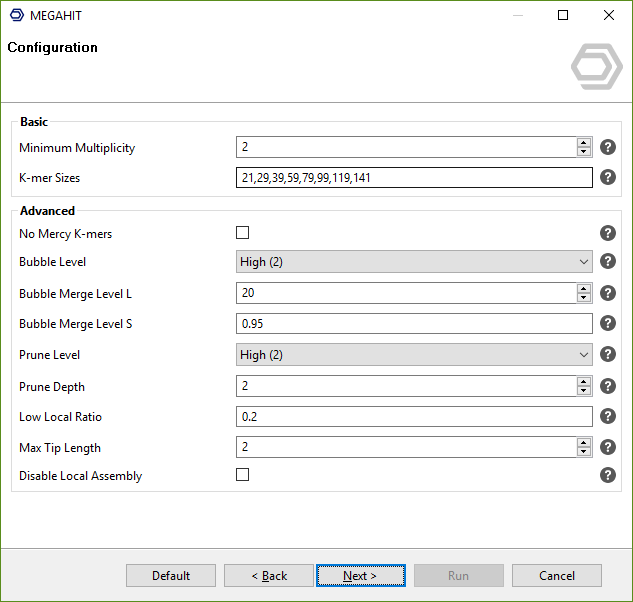
Figure 2. MEGAHIT assembly wizard: configuration page.
Output
- Save results locally: Download the output files from the cloud to the local machine after the job finishes. If unchecked, the output files remain in the cloud only and Contigs Fasta is disabled.
- Contigs Fasta: The final FASTA file containing the assembled contigs will be saved in this file location.
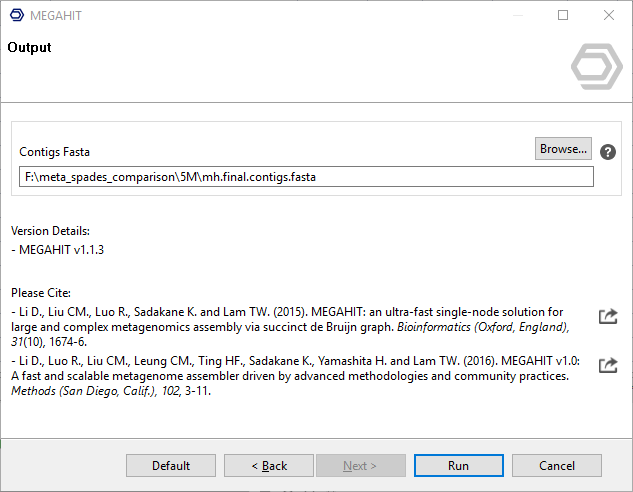
Figure 3. MEGAHIT assembly wizard: output page.
CloudSync Data Handling
MEGAHIT runs via Cloud Sync (see Cloud Sync). The last wizard page is the general CloudSync Data Handling page, where it is possible to configure where the input files are read from and where the output files are saved:
- Save local inputs in cloud: Keeps the input files uploaded to the cloud after the job finishes.
- Save results in cloud: Saves the MEGAHIT results to the user's Cloud Files space. It is always enabled when Save results locally is unchecked on the Output page.
- Cloud Folder: The cloud folder used for the options above.
- Email notification: Sends an email when the job finishes.
Results
The results of MEGAHIT are the assembled contigs in a multi FASTA file. Additionally, Quast is used for generating some basic statistics to assess the quality of the assembly, the PDF is accompanied by an Nx chart.
OmicsBox Engine
This tool can be run from the command line via the OmicsBox Engine.
Command: omicsbox megahit [options]
Inputs
| Flag | Type | Required | Description |
|---|---|---|---|
--i-read-files |
file (multiple) | Yes | Reads |
Parameters
| Flag | Type | Default | Range / Candidates | Required | Description |
|---|---|---|---|---|---|
--sequencing |
enum | single | singlepairedinterleaved |
No | Sequencing Data |
--upstream-pattern |
string | _1 | No | Upstream Files Pattern | |
--downstream-pattern |
string | _2 | No | Downstream Files Pattern | |
--minimum-multiplicity |
integer | 2 | No | Minimum Multiplicity | |
--kmer-sizes |
string | 29,39,59,79,99,119,141 | No | K-mer Sizes | |
--no-mercy-kmers |
boolean | false | No | No Mercy K-mers | |
--bubble-level |
enum | 2 | 012 |
No | Bubble Level |
--bubble-merge-l |
integer | 20 | ≥ 0 | No | Bubble Merge Level L |
--bubble-merge-s |
double | 0.95 | 0.0 – 1.0 | No | Bubble Merge Level S |
--prune-level |
enum | 2 | 0123 |
No | Prune Level |
--prune-depth |
integer | 2 | ≥ 0 | No | Prune Depth |
--low-local-ratio |
double | 0.2 | 0.0 – 1.0 | No | Low Local Ratio |
--max-tip-length |
integer | 2 | ≥ 0 | No | Max Tip Length |
--no-local |
boolean | false | No | Disable Local Assembly | |
--kmin1pass |
boolean | false | No | 1 Pass Mode | |
--min-contig-length |
integer | 200 | ≥ 200 | No | Minimum Contig Length |
--chart-format |
enum | box | boxpngpdfcsv |
No |
Parameter relationships
| Flag | When | Effect | Affected flags |
|---|---|---|---|
--sequencing |
paired |
enables | --upstream-pattern, --downstream-pattern |
Global options (
--local-folder,--cloud-folder,--output-format,--config,--detach,--verbose, …) are shared by every Engine tool and are not repeated here — see the OmicsBox Engine reference.