metaSPAdes
Introduction
SPAdes, St. Petersburg genome assembler, is an assembly toolkit containing various assembly pipelines. In OmicsBox, SPAdes is run with the --meta option, this flag is recommended when assembling metagenomic data sets. For more details, see this paper.
metaSPAdes (Figure 1, Figure 2, and Figure 3) addresses various challenges of metagenomic assembly by capitalizing on computational ideas that proved to be useful in assemblies of single cells and highly polymorphic diploid genomes. Note that SPAdes was initially designed for small genomes. It was tested on bacterial genomes, both single-cell MDA and standard isolates, as well as fungal and other small genomes. Currently, metaSPAdes supports only paired-end libraries. Note that metaSPAdes might be very sensitive to the presence of technical sequences remaining in the data, most notably adapter readthroughs, please run quality control and pre-process your data accordingly.
SPAdes is a de Bruijn graph-based assembler. Input reads are split into k-mers to create the graph and to find its Eulerian path, i.e. the shortest path that visits every edge exactly once. metaSPAdes employs a few modifications to avoid misassemblies, creating shorter high-quality contigs instead of a few long contigs.
metaSPAdes, in comparison to MEGAHIT, needs more resources and takes more time, but also creates better results, i.e. higher Nx values.
Input
- Up / Downstream Reads: Choose the files containing the paired-end reads respectively. SPAdes is not able to continue if the number of upstream reads doesn't exactly match the number of downstream reads, or if the read names differ.
- Read Orientation: For forward-reverse orientation, the forward reads correspond to the left reads, and the reverse reads, to the right. Similarly, in reverse-forward orientation left and right reads correspond to reverse and forward reads, respectively.
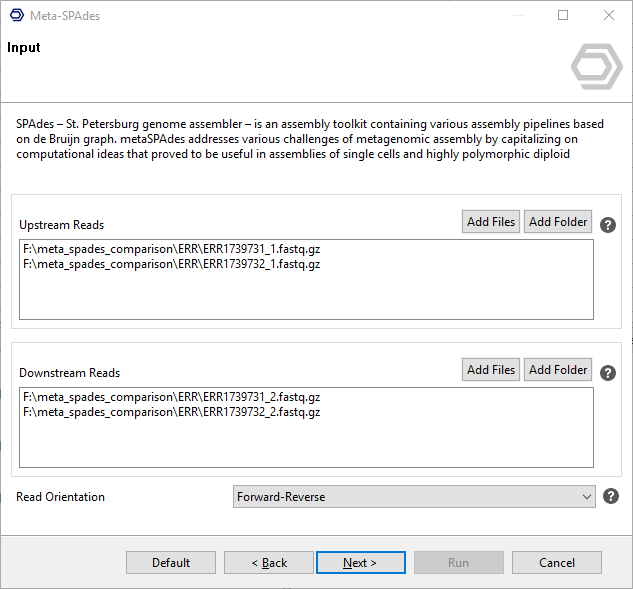
Figure 1. MetaSPAdes assembly wizard: input page.
Configuration
K-mer sizes: SPAdes will automatically select the k-mer sizes for graph construction. If desired otherwise, please provide a comma-separated list of odd k-mer sizes (1-128).
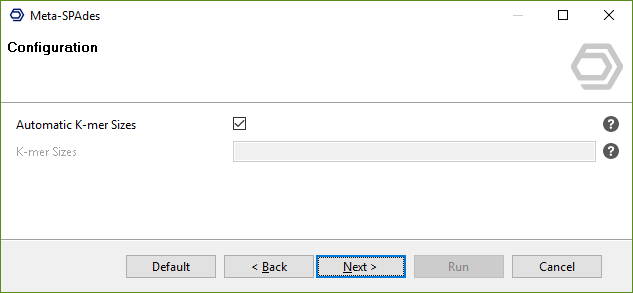
Figure 2. MetaSPAdes assembly wizard: configuration page.
Output
- Contigs Fasta: Choose where to save the resulting multi-fasta file.
- Scaffolds Fasta: Choose where to save the resulting file containing the scaffolds.
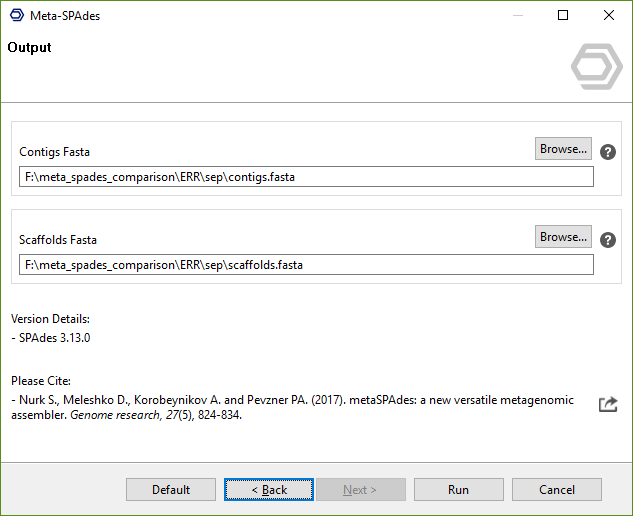
Figure 3. MetaSPAdes assembly wizard: output page.
The results of SPAdes are the assembled contigs and scaffolds in two separate multi FASTA files. Additionally, Quast is used to generate some basic statistics to assess the quality of the assembly, the PDF is accompanied by an Nx distribution chart.
OmicsBox Engine
This tool can be run from the command line via the OmicsBox Engine.
Command: omicsbox meta-spades [options]
Inputs
| Flag | Type | Required | Description |
|---|---|---|---|
--i-upstream-reads |
file (multiple) | Yes | Upstream Reads |
--i-downstream-reads |
file (multiple) | Yes | Downstream Reads |
--i-graph-folder |
file | No | Graph Files |
Parameters
| Flag | Type | Default | Range / Candidates | Required | Description |
|---|---|---|---|---|---|
--orientation |
enum | fr | frrfff |
No | Read Orientation |
--disable-rr |
boolean | false | No | Disable Repeat Resolution Stage | |
--phred-offset |
enum | auto | auto3364 |
No | PHRED Quality Offset |
--automatic-kmer-sizes |
boolean | true | No | Automatic K-mer Sizes | |
--kmer-sizes |
string | 33,55 | No | K-mer Sizes | |
--only-assembler |
boolean | false | No | Only Assembler | |
--save-graph |
boolean | false | No | Save Graph Files | |
--chart-format |
enum | box | boxpngpdfcsv |
No |
Parameter relationships
| Flag | When | Effect | Affected flags |
|---|---|---|---|
--automatic-kmer-sizes |
false |
enables | --kmer-sizes |
--save-graph |
true |
enables | --i-graph-folder |
Global options (
--local-folder,--cloud-folder,--output-format,--config,--detach,--verbose, …) are shared by every Engine tool and are not repeated here — see the OmicsBox Engine reference.
References
- Bankevich A et al. (2012). SPAdes: a new genome assembly algorithm and its applications to single-cell sequencing. Journal of computational biology : a journal of computational molecular cell biology, 19(5), 455-77.
- Nurk S., Meleshko D., Korobeynikov A. and Pevzner PA. (2017). metaSPAdes: a new versatile metagenomic assembler. Genome research, 27(5), 824-834.